Chapter 5 – Conditionals and recursion

Hi there,

The tip to read the chapter once (and taking notes on where I might find some obstacles) and then read it again a second time helped me tremendously.

The impression of “déjà vu” makes my second reading far more efficient. I am aiming to pick-up some speed with this reading tactic.

5.1 Modulus operator

A couple of months ago, I had to refresh my memory in order to explain the concept of remainder. However, I never thought that this concept would be helpful learning Python as well.

Wikipedia provides a full and comprehensive explanation of the modulo operation. I recommend to read it.

Basically, a remainder is the number that is left when you divide two numbers that are not multiples.

Modulo operation finds the remainder of a division

Modulo operation finds the remainder of a division

In Python, the modulus operator is the percent sign %.

If the remainder of x divided by y is zero, then we infer that x is divisible by y or x is a multiple of y.
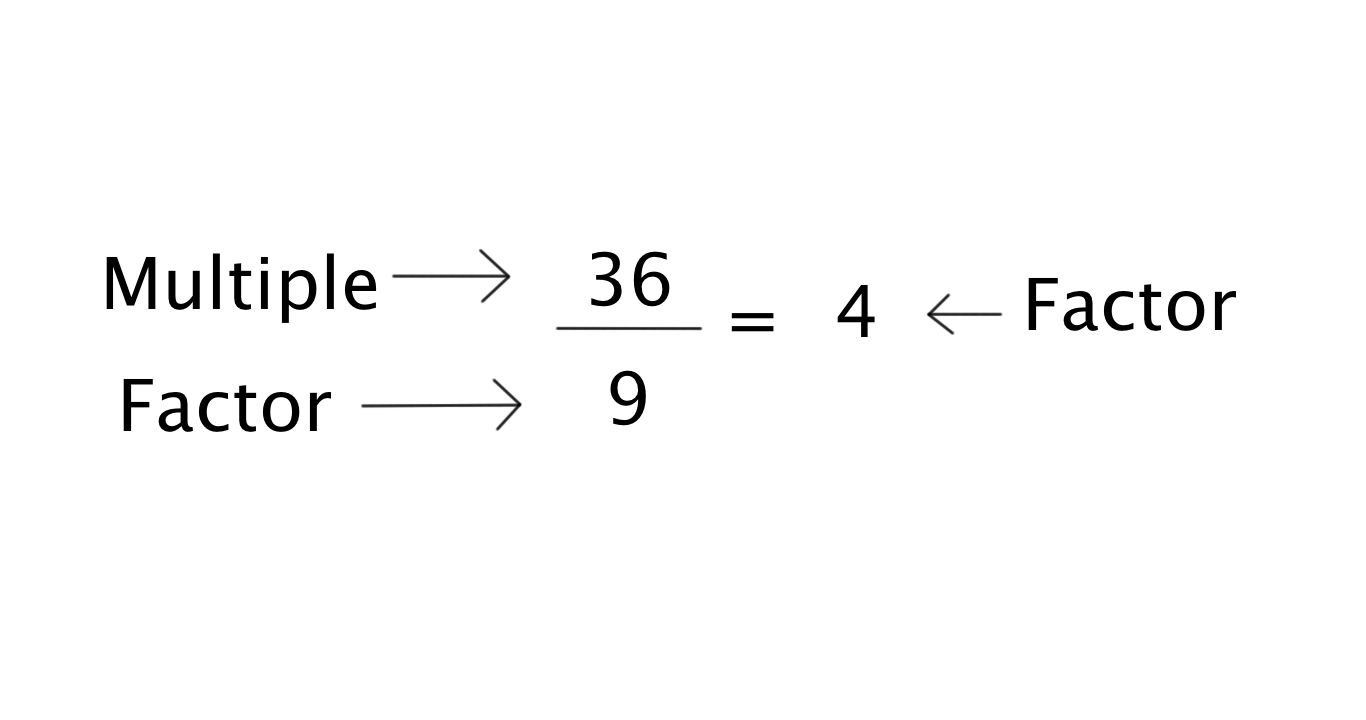
Multiple and Factors

Multiple and Factors

The book provides a clear example:

>>> quotient = 7/3
>>> print quotient
2
>>> remainder = 7 % 3
>>> print remainder
1

5.1 Boolean expressions

A Boolean expression is an expression that is either true or false.

The operator == compares two operands and verify whether they are equal or not.

>>> 5 == 5
True

>>> 5 == 6
False

If we verify the type of True and False, we discover that they belong to the type bool.

>>> type (True)<type ‘bool’>

>>> type (False)
<type ‘bool’>

Relational operators :

  • x == y   # x is equal to y
  • x !=  y   # x is not equal to y
  • x > y   # x is greater than y
  • x < y   # x is less than y
  • x >= y   # x is greater or equal to y
  • x <= y   # x is less or equal to y

A common error is to use a single equal sign (=) instead of a double equal sign ( == ). Remember that (=) is an assignment operator and ( == ) is a relational operator.

x = y    # x gets the value of y

versus

x == y    # x is equal to y

Who is Boole? George Boole was an English mathematician, philosopher and logician of the 19th century. You may click on his name in order to find out more about him.

5.3 Logical operators

  • and
    x > 0 and x < 10 is true if both relations are true
  • or
    x > 0 or x < 10 is true if either relation is true
  • not
    The not operator negates a Boolean expression.
    not ( x < 10 ) is true if x is greater than 10 and it is false if x is less than 10.

5.4 Conditional execution

This is where the fun starts.

Conditional statements provide Python users with the ability to to check conditions and change the behaviour of the program accordingly.
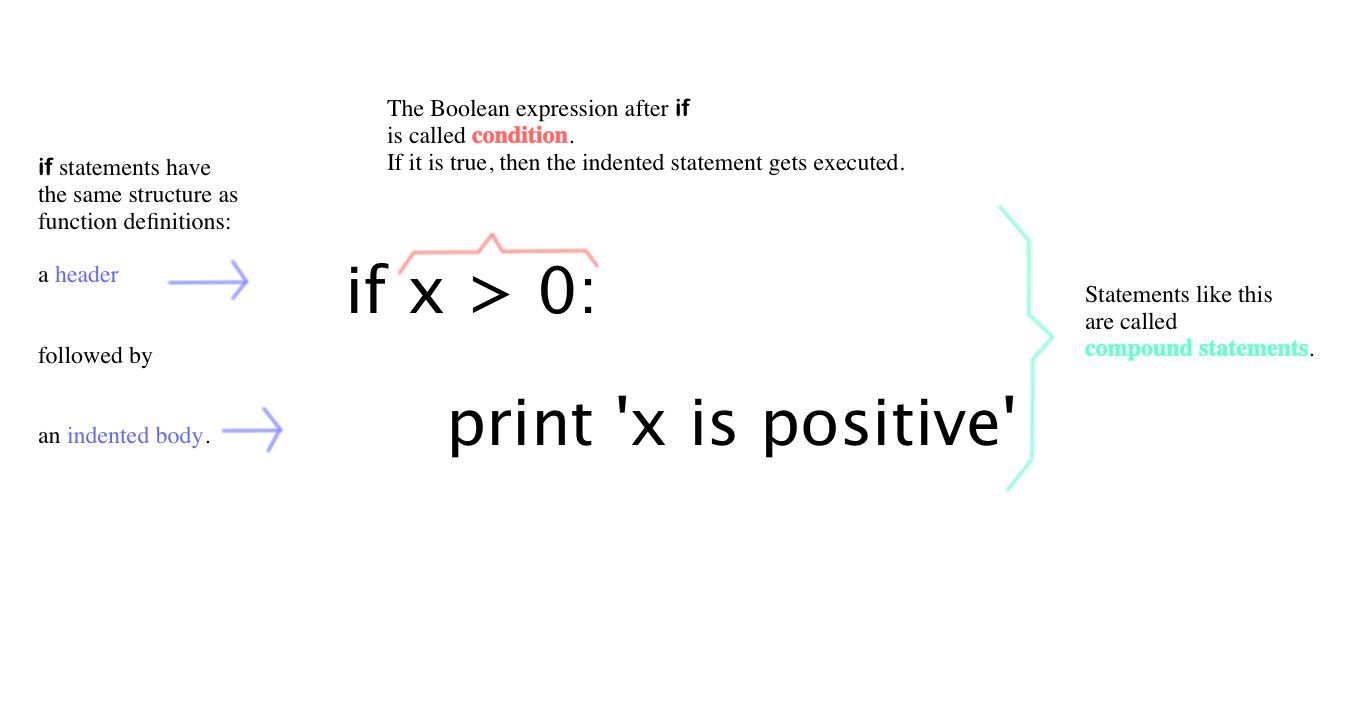
Conditional execution

Conditional execution


There is no limit on the number of statements that can appear in the body, but there has to be at least one.

As we advance and write more elaborate functions and eventually programs, there is a useful statement called pass which does nothing. It is a place keeper for code to be written.

For instance:

if x < 0:    pass       # code to be written at a later time

5.5. Alternative execution

The alternative execution provides two (2) possibilities and the condition determines which one gets executed.

This is a second form of the if statement. The syntax looks like this:

if x % 2 == 0:    print ‘x is even’
else:
print ‘x is odd’

The condition can either be true or false. So only one alternative will be executed.

The alternatives are called branches, because they are branches in the flow of execution.

5.6 Chained conditionals

When we have more than two possibilities, then we need more than two branches. Chained conditionals enable us to express a computation with more than two alternatives.

if x < y :    print ‘x is less than y
elif x > y :
print ‘x is greater than y
else:
print ‘x and y are equal’

As soon as Python finds a True Boolean expression, then the branch will be executed.

elif

  • It is the abbreviation of “else if”.
  • There is no limit on the number of elif statements.

else

  • If there is an else statement, it has to be at the end.
  • The else statement is optional.

Python’s flow of execution:

Each condition is checked in order. If the first is false, the next is checked, and so on. If one of them is true, the corresponding branch executes, and the statement ends. Even if more than one condition is true, only the first true branch executes.

5.7 Nested conditionals

Conditionals can also be nested within another. This concept reminded me of the nested functions we saw on Chapter 3 and the Matryoshka image.

Python Nested Conditionals

Python Nested Conditionals

Love-Hate relationship with nested conditionals:

Love: Indentation provides nested conditionals with an apparent structure.

Hate: Beware, it is easy to get frustrated trying to find indentation bugs.

The author, Allen B. Downey points out that nested conditionals become difficult to read at a glance.

Logical operators often provide a way to simplify nested conditionals.
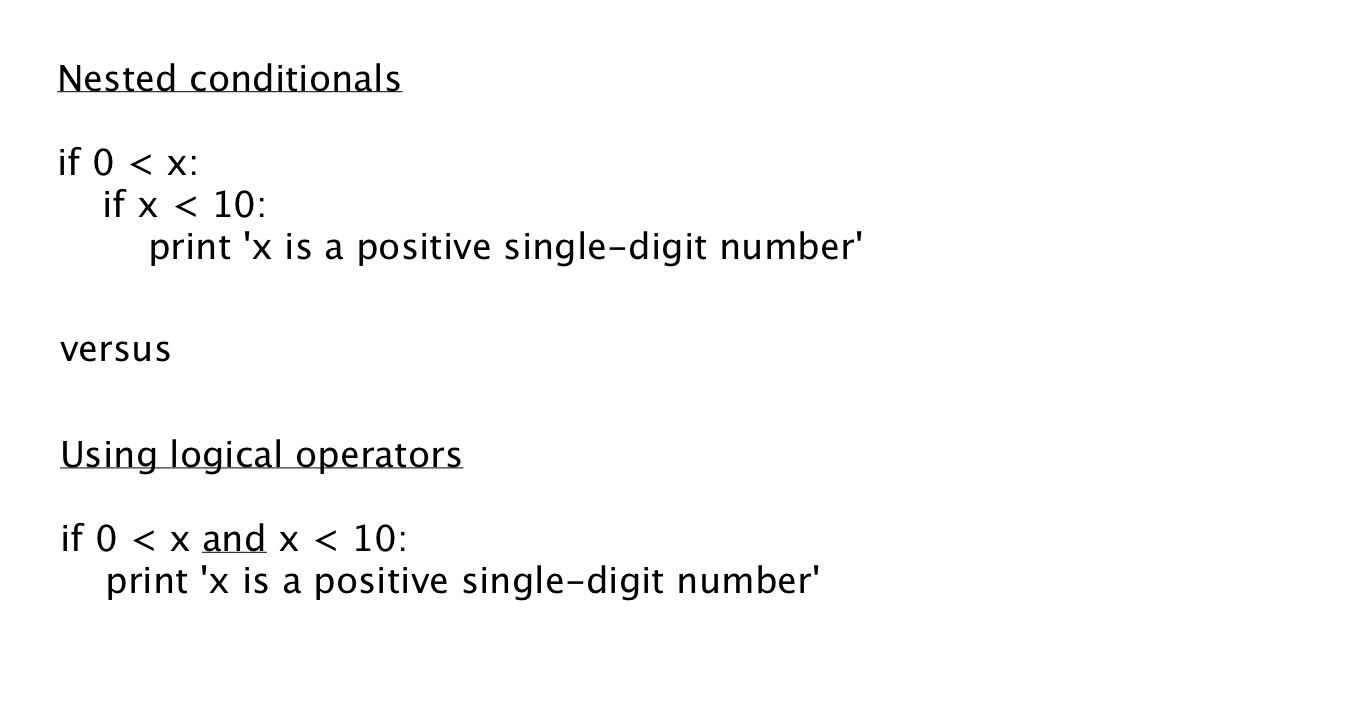
Nested conditionals versus logical operators

Nested conditionals versus logical operators

NOTE: In this chapter, the author used the word trichotomy. I looked up in Wikipedia and it means “splitting into three parts”.

5.8 Recursion

In the Python world, a function can call another function and a function can call itself as well.

A function that calls itself is recursive; the process is called recursion.

Recursive function with a return statement

Recursive function with a return statement

5.9 Stack diagrams for recursive functions

Stack diagrams are helpful to illustrate a function call or a recursive function.

Every time a function gets called, Python creates a new function frame, which contains the function’s local variables and parameters. For a recursive function, there might be more than one frame on the stack at the same time.

Think Python: Exercise 5.1

Think Python: Exercise 5.1

Exercise 5.2

Let us make a break and laugh a bit.

When I read this exercise I had the impression I was in the same situation as this:
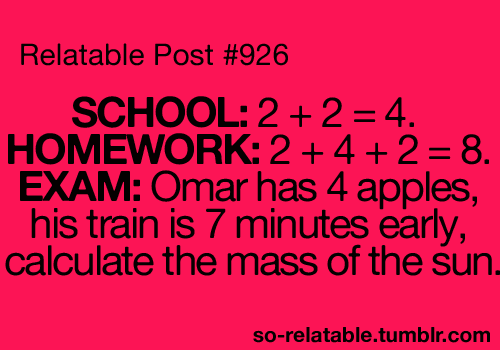
School and Homework verus Exam questions

School and Homework verus Exam questions

Source: So Relatable

Here is the question:

Write a function called do_n that takes a function object and a number, n, as arguments, and that calls the given function n times.

What blocked me was the expression “function object“. So, I had to go back to Chapter 3 (p.22 and p. 29) to recall the definition.

A function object is a value you can assign to a variable or pass as an argument. For example, do_twice is a function that takes a function object as an argument and calls it twice:

def do_twice ( f ):
f ( )

f ( )

Here is an example that uses do_twice to call a function named print_spam twice.

def print_spam( ):    print ‘spam’

do_twice ( print_spam )

Inspiring me from this reference, here is what I found:

>>> def do_n (f, n):
…     if n <= 0:
…             return
…     else:
…             f()
…             do_n(f, n-1)

>>> def lyrics ():
…     print “I’m singing in the rain ”

>>> do_n (lyrics, 3)
I’m singing in the rain
>>>

5.10 Infinite recursion

If a recursion never reaches a base case, it goes on making recursive calls forever, and the program never terminates. This is known as infinite recursion, and it is generally not a good idea.

Once Python reaches 1000 recurse frames on the stack it will report an error.

5.11 Keyboard input

We will begin to write code blocks that require the user to interact.

In Python 2: raw_input function

In Python 3: input function

When this function is called, the program stops and waits for the user to type something. When the user presses “Enter“, the program resumes and raw_input returns what the user typed as a string.

When you ask the user for some input. It is best to state the question. For instance:

>>> sports = raw_input (‘Do you play any volley-ball or football?’\n’)
volleyball

>>> print sports
volleyball

The sequence \n at the end of the prompt represents a newline, which is a special character that causes a line break. That is why the user’s input appears below the prompt.

By default, the user’s answers are considered stings. However, we can change that like this:

>>> prompt = “What is the speed of sound in meters per second in dry air?\n”
>>> speed_sound = raw_input(prompt)
What is the speed of sound in meters per second in dry air?
343.2

>>> speed_sound
‘343.2’
>>> float(speed_sound)
343.2
>>>

5.12 Debugging

Python provides a hints for debugging such as:

  • What kind of error it was, and
  • Where it occurred.

Beware of these mistakes because they are a bit tricky to find:

  • whitespace errors: spaces and tabs are invisible to Python
  • runtime errors: watch for integer numbers versus floating numbers when dividing.

Python can indicate the line where the error occurred. However, verify the previous lines as well in order to correct the error more quickly.

So, this is it for the theory of chapter 5!


It does not matter how slowly you go, so long as you do not stop — Confucius, Chinese philosopher (551 BC – 479 BC)


***

Acknowledgments :

These notes represent my understanding from the book Think Python: How to Think Like a Computer Scientist written by Allen B. Downey.

Part of the chapter is transcribed and all the quotes unless specified otherwise come directly from his book.

Thank you Professor Downey for making this knowledge available.


Also, I would like to thank the open source community for their valuable contribution in making resources on programming available.

Thank you

Exercises from chapter 3 – Think Python

Let us play with the concepts from chapter 3.

Exercise 3.3) p. 29

Python provides a built-in function called len that returns the length of a string, so the value of len(‘allen’) is 5.
Write a function named right_justify that takes a string named s as a parameter and prints the string with enough leading spaces so that the last letter of the string is in column 70 of the display.

>>> right_justify('allen')
                                                   allen
Here is the answer:
>>> def right_justify(s):
…     print (70 – len(s)) * ” ” + s

>>> right_justify(‘allen’)
allen
>>>
Logic:

I knew that:
70 = padding (blank characters) + s
Following the same logic, the padding would be equal to 70 – s.

****

Exercise 3.4) p. 29

A function object is a value you can assign to a variable or pass as an argument.

You can go back to the first part of Chapter 3 in order to recall the concept.

Exercise 3.4) p. 29

A function object is a value you can assign to a variable or pass as an argument. For example, do_twice is a function that takes a function object as an argument and calls it twice:

def do_twice(f):        # The function 'do_twice' uses the parameter 'f'.
    f()                 # If parameter 'f' happens to be a function, then it will be called twice. 
    f()

Here’s an example that uses do_twice to call a function named print_spam twice.

def print_spam():
    print 'spam'

do_twice(print_spam)
Remember about “nested functions” and the metaphor of the Matryoshka, here is the perfect example:
Questions:
  1. Type this example into a script and test it:
    >>>
    def do_twice(f):

    …     f()
    …     f()

    >>> def print_spam():
    …     print ‘spam’

    >>> do_twice(print_spam)
    spam
    spam
    >>>

  2. Modify do_twice so that it takes two arguments, a function object and a value, and calls the function twice, passing the value as an argument.

    >>>def do_twice (f, bingo):        # The function ‘do_twice’ has two parameters. ‘f’ is a function object and ‘bingo’ is a parameter referring to a particular value.
    …    f (bingo)                                    # Here we will call function ‘f’ twice with the variable ‘bingo’ as an argument.
    …    f (bingo)

  3. Write a more general version of print_spam, called print_twice, that takes a string as a parameter and prints it twice.
    >>> def print_twice(banana):
    …     print banana
    …     print banana

    >>>
  4. Use the modified version of do_twice to call print_twice twice, passing ‘spam’ as an argument.
    >>> def do_twice (f, bingo):
    …     f(bingo)
    …     f(bingo)

    >>>
    >>> def print_twice (banana):
    …     print banana
    …     print banana

    >>>
    >>> do_twice (print_twice,’spam’)
    spam
    spam
    spam
    spam
    >>>
  5. Define a new function called do_four that takes a function object and a value and calls the function four times, passing the value as a parameter. There should be only two statements in the body of this function, not four.
    Working on what we already defined as a function, I will use:
    >>> def print_twice(banana):
    …     print banana
    …     print banana

    >>>
    >>> def do_four (g, cat):
    …     g(cat)
    …     g(cat)

    >>>
    >>> do_four(print_twice, ‘Eureka’)
    Eureka
    Eureka
    Eureka
    Eureka
    >>>
    NOTE: My answer does not match the solution provided by the link below. So, I still have to double-check it.

Solution: http://thinkpython.com/code/do_four.py

Exercise 3.5) p.29-30

This exercise can be done using only the statements and other features we have learned so far.

1. Write a function that draws a grid like the following:

Exercise 3-5 Think Python

Exercise 3-5 Think Python

Hint: to print more than one value on a line, you can print a comma-separated sequence:

print '+', '-'

If the sequence ends with a comma, Python leaves the line unfinished, so the value printed next appears on the same line.

print '+',
print '-'

The output of these statements is ‘+ -‘.
A print statement all by itself ends the current line and goes to the next line.

Write a function that draws a similar grid with four rows and four columns.

So, here are the early stages of me coding:

Step 1) Write the code in Sublime Text :

x = ‘+’
y = ‘ -‘
w = ‘ ‘
z = ‘|’

f = (x + 4*y + w) * 2 + x
g = (z + 9*w)*2 + z

def print_twice (banana):
print banana
print banana

def do_twice (f, apple):
f(apple)
f(apple)

def box ():
print f
do_twice(print_twice,g)
print f
do_twice(print_twice,g)
print f

box()

Step 2) Save the code under small_box.pyStep 3) Run the program in the Terminal :

Here is the grid:


2. Write a function that draws a similar grid with four rows and four columns.

Step 1) Write the code in Sublime Text :

x = ‘+’
y = ‘ -‘
w = ‘ ‘
z = ‘|’

f = (x + 4*y + w) * 4 + x
g = (z + 9*w)*4 + z

def print_twice (banana):
print banana
print banana

def do_twice (f, apple):
f(apple)
f(apple)

def box ():
print f
do_twice(print_twice,g)
print f
do_twice(print_twice,g)

def big_box():
box()
box()
print f

big_box()

Step 2) Save the code under big_box.py

Step 3) Run the program in the Terminal :

Here is the grid:


Solution: http: // thinkpython. com/ code/ grid. py.

Credit: This exercise is based on an exercise in Oualline, Practical C Programming, Third Edition, O’Reilly Media, 1997.

Problems and Solutions

Problems and Solutions

Chapter 3: Functions (Part I)

New terms from chapter 3 (Think Python: Think Like a Computer Scientist) – PART I

I found this chapter very dense. So, I will break it down in three (3) parts.

3.1 Function calls

  • Function : name + sequence of statements that perform a computation

The book “Think Python: Think Like a Computer Scientist” provides the following definition:

a function is a named sequence of statements that performs a computation

  • Function call:

Once the function’s name and sequence of statements have been specified, I can “call” the function by name.

Here is an example:

>>>type (32)
<type ‘int’>

The name of the function is type.

The expression in parenthesis is called an argument.

The result of this function is the type of the argument.

It is common to say that a function “takes” an argument and “returns” a result. The result is called the return value

Here is an illustration of a function that I found on Wikipedia:

Wikipedia Function machine

Wikipedia Function machine: A function f takes an input x, and returns an output f(x)

Source:http://en.wikipedia.org/wiki/Function_%28mathematics%29

3.2 Type conversion functions

Python provides built-in functions that convert values from one type to another

For instance:

The int function takes any number value and converts it to an integer. If the number is a floating-point value, the function will truncate the fraction part (NOTE: The function does not round off)

For instance:

>>> int(5.25)
5

>>>int(-2.3)-2

The float function converts integers numbers and strings numbers to floating-point numbers.

For example:

>>> float(32)
32.0
>>> float(‘3.14159’)
3.14159

The str function converts its argument to a string.

Here is an illustration:

>>> str(32)
’32’
>>> str(3.14159)
‘3.14159’

3.3 Math functions

Python has a math module that provides most of the familiar mathematical functions

  • A module: A file that contains a collection of related functions. Also, before I can use the module I have to import it.

For instance:

>>> import math
>>>

>>> print math
<module ‘math’=”” from=”” ‘=”” library=”” frameworks=”” python.framework=”” versions=”” 2.7=”” lib=”” python2.7=”” <span=”” class=”hiddenSpellError” pre=””>lib-dynload/math.so’>

Statement: >>> import math

Module object: math

The module object contains the functions and variables defined in the module

  • Dot notation the name of the module and the name of the function, separated by a dot. Do notation is used to access one of the functions in the module.

Example no1:

>>> signal_power = 10
>>> noise_power = 2.5
>>> ratio = signal_power / noise_power
>>> decibels = 10 * math.log10(ratio)
>>> print decibels
6.02059991328

NOTE 1: This example uses the function of log10 to compute a signal-to-noise ratio in decibels.

NOTE 2: The math module provides the function log, which computes logarithms base e.

Example no2: Convert degrees to radians

>>> degrees = 45
>>> radians = degrees / 360.0 * 2 * math.pi # To convert from degrees to radians: divide the degrees by 360 and multiply it by 2∏
>>> math.sin(radians) # Find the sin of radians
0.7071067811865475

NOTE: The name of the variable is a hint that sin and the other trigonometric functions (cos, tan, etc.) take arguments in radians.

The expression math.pi gets the variable pi from the math module. The value of the variable pi is an approximation of ∏, accurate to about 15 digits

3.4 Composition

Program components:

  • variables
  • expressions
  • statements

To compose: The ability to take small building blocks and build up with them.

the argument of a function can be any kind of expression, including arithmetic operators […] Almost anywhere you can put a value, you can put an arbitrary expression, with one exception:

the left side of an assignment statement has to be a variable name. Any other expression on the left side is a syntax error (we will see exceptions to this rule later)

Here is an illustration:

>>> degrees = 45
>>> x = math.sin(degrees / 360.0 * 2 * math.pi)
>>> print x
0.707106781187
>>> y = math.exp(math.log(x+1))
>>> print y
1.70710678119

COMPOSITION RULE: The left side of an assignment statement has to be a variable name. Any other expression on the left side is a syntax error (I will see exceptions to this rule later)

Writing an ASSIGNMENT STATEMENT this way will work:

>>> minutes = hours * 60 #The writing of this assignment statement is adequate since the left side of the assignment statement is the  variable name

>>>

Writing an ASSIGNMENT STATEMENT the way described below will generate and error:

>>> hours * 60 = minutes
File “<stdin>”, line 1
SyntaxError: can’t assign to operator
>>>

3.5 Adding new functions

– Function definition: def

A function definition specifies the name of a new function and the sequence of statements that execute when the function is called

– Function names rule of thumb:

  • letters, numbers and some punctuation marks are legal,
  • the first character of the function name can’t be a number
  • keyword as the name of a function is illegal
  • avoid having a variable and a function with the same name

The empty parentheses after the [function definition] name indicate that this function doesn’t take any arguments

– Interactive mode: If you type a function definition in interactive mode, the interpreter prints ellipses (…) to let you know that the definition isn’t complete.
For instance:

>>> def print_lyrics():

Header: It is the first line of the function definition and it has to end with a colon

– Body: All the subsequent lines after the first line of the function definition and they have to be indented. There is no limit as to the number of statements a function definition may have.
NOTE: By convention, the indentation is always four spaces (see Section 3.14)

– Strings: The strings in the print statements are enclosed in double quotes.
NOTE: Single quotes and double quotes do the same thing; most people use single quotes except in cases like this where a single quote (which is also an apostrophe) appears in the string.

– End: To end a function, I have to enter an empty line (just hit enter). This is not necessary in a script mode

Here is an example:

>>> def print_lyrics():
…     print “I’m a lumberjack, and I’m okay.”
…     print “I sleep all night and work all day.”

>>>

I can recognize the keyword that indicates that it is a function definition: def

  • I can also recognize the name of the function: print_lyrics
  • The header of the definition function is: >>> def print_lyrics():    Please note that it ends with a colon.
  • The body of the definition function is everything that follows and it is indented
  • The strings in the print statements of the function definition are enclosed in double quotes and are indented after the ellipsis (the three dots) :

…     print “I’m a lumberjack, and I’m okay.”
…     print “I sleep all night and work all day.”

  • The end of the function: After the third (3rd) ellipsis, I hit enter again and it comes back to >>>

– Defining a function: After I defined my function definition (name, header, body, strings, end), I can ask python to print it (or recall it). Python will create a variable with the same name. See below:

>>> print print_lyrics
<function print_lyrics at 0x10049acf8>
>>>

– Value type of the function definition we just created can be found as illustrated below:

>>> type (print_lyrics)
<type ‘function’>

In other words, the value of print_lyrics is a function object, which has type ‘function’.

The syntax for calling the new function is the same as for built-in functions […] Once you have defined a function, you can use it inside another function

Here is a fun example of how pop music (Lady Gaga / Poker face) and Python can mix.

  • Step 1: Define the function print_chorus_pf

>>> def print_chorus_pf():
…     print “P-p-p-poker face, p-p-poker face”
…     print “(Mum mum mum mah)”

  • Step 2: Define the function repeat_chorus_pf

>>> def repeat_chorus_pf():
…     print_chorus_pf()

  • Step 3: Call function repeat_chorus_pf

>>> repeat_chorus_pf()
P-p-p-poker face, p-p-poker face
(Mum mum mum mah)
P-p-p-poker face, p-p-poker face
(Mum mum mum mah)
>>>

3.6 Definitions and uses

This program contains two function definitions: print_chorus_pf and repeat_chorus_pf.

Function definitions get executed just like other statements, but the effect is to create function objects.

The statements inside the function do not get executed until the function is called, and the function definition generates no output […]

As you might expect, you have to create a function before you can execute it.

Exercise 3.1) Move the last line of this program to the top, so the function call appears before the definitions. Run the program and see what error message you get.

>>> repeat_chorus_pf()
Traceback (most recent call last):
File “<stdin>”, line 1, in <module>
NameError: name ‘repeat_chorus_pf’ is not defined
>>>

Exercise 3.2. Move the function call back to the bottom and move the definition of print_chorus_pf after the definition of repeat_chorus_pf. What happens when you run this program?

>>> def repeat_chorus_pf():
…     print_chorus_pf()

>>> def print_chorus_pf():
…     print “P-p-p-poker face, p-p-poker face”
…     print “(Mum mum mum mah)”

>>> repeat_chorus_pf
<function repeat_chorus_pf at 0x10049acf8>
>>>


***

Acknowledgments :

These notes represent my understanding from the book Think Python: How to Think Like a Computer Scientist written by Allen B. Downey.

Part of the chapter is transcribed and all the quotes unless specified otherwise come directly from his book.

Thank you Professor Downey for making this knowledge available.


Also, I would like to thank the open source community for their valuable contribution in making resources on programming available.

Thank you